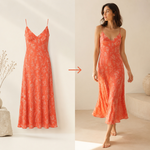
AI Outfit Try On
Создавайте реалистичные виртуальные примерки одежды по фото человека и предмета гардероба.
Скриншоты
Функции
Реалистичная подгонка одежды
Подгоняйте одежду по фигуре человека с реалистичной драпировкой, складками и тенями.
Узнаваемый человек
Сохраняйте лицо, пропорции тела и позу человека, меняя только одежду.
Пользовательские визуальные стили
Выберите повседневный, редакционный, уличный или чистый студийный образ для готового изображения.
Гибкое кадрирование
Выберите квадратное, портретное или альбомное соотношение сторон в соответствии с целью использования.
Несколько моделей рендеринга
Выберите модель изображений и создайте ещё одну версию с другим стилем или моделью.
История и повторная генерация
Снова откройте недавние примерки на боковой панели истории или повторите генерацию незавершённого изображения, не начиная всё сначала.
О нас
AI Outfit Try On переносит одежду с фото товара на человека и создаёт реалистичное изображение образа на нём. ПРИМЕРЯЙТЕ ЛЮБУЮ ОДЕЖДУ Загрузите фото человека и фото предмета одежды. Одежда подгоняется по фигуре с реалистичной драпировкой, складками и тенями, поэтому результат выглядит как настоящая фотография, а не наложенный поверх слой. СОХРАНЯЙТЕ УЗНАВАЕМОСТЬ ЧЕЛОВЕКА Лицо, пропорции тела и поза на исходном фото сохраняются. Меняется только одежда. ВЫБИРАЙТЕ ОБРАЗ Выберите стиль готового изображения: естественный повседневный образ, модную редакционную съёмку с драматичным освещением, непринуждённый уличный образ или чистый студийный кадр на однотонном фоне. НАСТРАИВАЙТЕ КАДР Выберите соотношение сторон для результата, чтобы изображение подходило для нужного места использования: от квадратных форматов для соцсетей до вертикальных портретных и широких альбомных кадров. ВЫБИРАЙТЕ МОДЕЛЬ РЕНДЕРИНГА Выберите модель изображений для создания примерки и в любой момент сгенерируйте ещё одну версию с другим стилем или моделью. ПРОСМАТРИВАЙТЕ И СКАЧИВАЙТЕ Готовые изображения отображаются на холсте в полном размере и доступны для скачивания. На боковой панели истории рядом с рабочей областью сохраняются недавние примерки в этом инструменте, а любой предыдущий результат можно снова открыть на холсте. ПОВТОРЯЙТЕ ГЕНЕРАЦИЮ БЕЗ НАЧАЛА С НУЛЯ Если изображение не удалось создать, повторите генерацию только для него, не переделывая остальную работу. РАБОТАЙТЕ НА СВОЁМ ЯЗЫКЕ Интерфейс доступен на нескольких языках. БОЛЬШЕ ИНСТРУМЕНТОВ ДЛЯ РАБОТЫ С ИЗОБРАЖЕНИЯМИ В том же аккаунте доступен расширенный каталог инструментов для работы с изображениями и наборов для нескольких изображений, включая рабочие процессы для портретов, товаров и редактирования фотографий.
Часто задаваемые вопросы
Какие фотографии мне нужны?
Загрузите фото человека и фото предмета одежды, который хотите примерить.
Останется ли человек узнаваемым?
Лицо, пропорции тела и поза на исходном фото сохраняются. Меняется только одежда.
Могу ли я выбрать стиль и формат изображения?
Да. Выберите повседневный, редакционный, уличный или студийный образ, а также квадратное, портретное или альбомное соотношение сторон.
Могу ли я создавать разные версии?
Да. Выберите модель рендеринга и в любой момент сгенерируйте ещё одну версию с другим стилем или моделью.
Могу ли я скачивать результаты и возвращаться к ним?
Готовые изображения можно скачать в полном размере. Недавние примерки сохраняются на боковой панели истории, и их можно снова открыть на холсте.
Конфиденциальность и требования
- Разрешения
- Для отслеживания кредитов и сохранения истории генераций требуется войти в аккаунт.
- Языки
- English (United States)