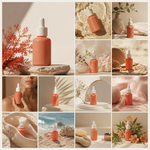
AI Product Photo Studio
Crie conjuntos consistentes de imagens de marketing a partir das suas próprias fotos de produto.
Capturas de Tela
Recursos
Consistência do produto
Envie fotos e descrições do produto para manter seu formato, marca e cor inalterados em todas as cenas.
Conjuntos de cenas planejados
Gere uma lista de cenas com direção de arte e legendas que definem quantas cenas a campanha precisa e o que cada uma mostra.
Revisão de cenas
Revise e edite o texto de cada cena antes de renderizar qualquer imagem.
Estilos visuais
Escolha entre os estilos estúdio clean, lifestyle natural, luz dura dramática, luz natural suave ou flat lay visto de cima.
Enquadramento flexível
Defina uma proporção quadrada, vertical ou horizontal para todo o conjunto de imagens.
Gerenciamento de conjuntos
Baixe as cenas individualmente ou juntas, tente novamente uma única cena e reabra sessões anteriores ou planos inacabados.
Sobre
AI Product Photo Studio transforma fotos de um único produto em um conjunto de imagens de marketing, cada uma em uma cena diferente, todas compartilhando um visual consistente. COMECE COM O SEU PRÓPRIO PRODUTO Envie fotos do produto e descreva-o. O produto aparece em todas as cenas com formato, marca e cor inalterados, para que todo o conjunto mostre o mesmo item, e não algo apenas parecido. UM CONJUNTO PLANEJADO, NÃO UMA ÚNICA IMAGEM A lista de cenas é criada para você a partir da sua descrição: quantas cenas a campanha precisa e o que cada uma mostra, com direção de arte para manter o tema, a paleta e a iluminação coerentes em todo o conjunto. REVISE ANTES DE QUALQUER RENDERIZAÇÃO O plano é exibido como uma lista de cenas, com uma legenda para cada uma. Leia, edite o texto de qualquer cena e renderize somente quando ele disser o que você deseja. ESCOLHA O ESTILO VISUAL Defina o visual de toda a sessão de fotos — estúdio clean, lifestyle em um ambiente natural, luz dura dramática, luz natural suave ou flat lay visto de cima com objetos dispostos em cena. DEFINA O ENQUADRAMENTO Escolha a proporção do conjunto para que as imagens se ajustem aos locais onde serão usadas, desde recortes quadrados para redes sociais até formatos verticais e horizontais amplos. BAIXE O CONJUNTO COMPLETO As cenas concluídas aparecem juntas na tela. Baixe-as uma por uma ou baixe o conjunto inteiro de uma só vez. TENTE NOVAMENTE UMA ÚNICA CENA Se uma cena não ficar como esperado, tente novamente apenas essa cena. O restante do conjunto permanece intacto. VOLTE A SESSÕES ANTERIORES Cada sessão é mantida como um conjunto, e não como imagens soltas, com seu título e número de cenas, e pode ser reaberta na íntegra. Um plano que você escreveu, mas nunca renderizou, pode ser retomado mais tarde. TRABALHE NO SEU IDIOMA Escolha o idioma em que o plano e as legendas serão escritos. A interface está disponível em vários idiomas. MAIS FERRAMENTAS DE IMAGEM A mesma conta dá acesso a um catálogo mais amplo de ferramentas de imagem e pacotes de múltiplas imagens, incluindo fluxos de trabalho para produtos, retratos e edição de fotos.
Perguntas Frequentes
Posso usar minhas próprias fotos de produto?
Sim. Envie fotos de um único produto e descreva-o para que o mesmo produto apareça de forma consistente em todas as cenas.
Posso revisar o plano de imagens antes de renderizar?
Sim. O app mostra uma lista de cenas com legendas que você pode ler e editar antes de renderizar.
Quais estilos visuais estão disponíveis?
Você pode escolher entre estúdio clean, lifestyle em um ambiente natural, luz dura dramática, luz natural suave ou flat lay visto de cima com objetos dispostos em cena.
Posso tentar novamente apenas uma imagem?
Sim. Você pode tentar novamente uma única cena sem alterar o restante do conjunto.
Privacidade e requisitos
- Idiomas
- English (United States)